Why people often confuse OA Zalo Groups and Mini Apps
When people receive a link on Zalo, they often only see an open button or a displayed name without knowing exactly where the link will take them. Some links lead to a Zalo OA where users can follow official information. Some links lead to a Zalo Group where many members can chat and exchange ideas. Others open a Mini App for booking, searching, shopping, using a service, or completing a specific action inside Zalo. Because all three can be shared as links, they are easy to mix up.
Knowing the difference helps you avoid opening the wrong place, joining the wrong group, following the wrong channel, or using a utility you do not actually need. For new Zalo users, Vietnamese users overseas, or anyone looking for official information, communities, or service utilities, understanding how a Zalo OA differs from Zalo Groups and Mini Apps makes the experience clearer, safer, and more efficient.
- Zalo OA, Zalo Groups, and Mini Apps can all be shared through links, which makes them easy to confuse.
- Understanding the difference helps you know whether to follow information, join a community, or use a service utility.
A quick overview of Zalo OA Zalo Groups and Mini Apps
A Zalo OA can be understood as the official information channel of a brand, organization, shop, service provider, community, or public body on Zalo. Users usually follow an OA to receive announcements, read posts, get updates, send questions, or follow official content from that entity. If you need the latest update from a store, class, hospital, school, agency, or brand, the OA is often the right place to open first.
A Zalo Group is a multi-member chat space. When you join a group, you can read messages, ask questions, share experience, exchange documents, find jobs, buy and sell, connect locally, or join a community with shared needs. A Mini App is different: it is a small utility that runs inside Zalo and is usually designed for a specific action, such as booking, checking an order, viewing services, shopping, collecting points, submitting a form, or using a function provided by an organization.
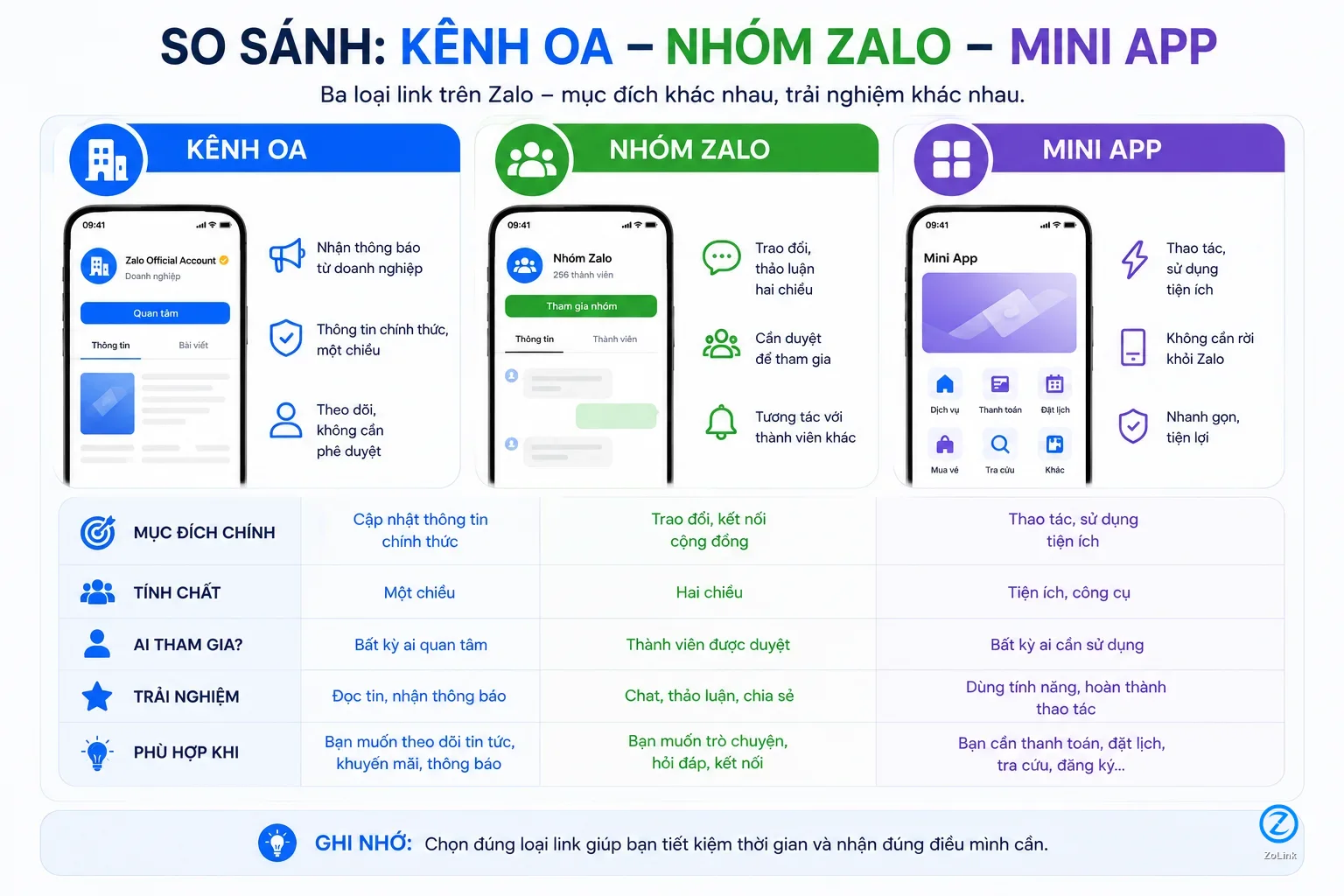
- A Zalo OA is suitable for following official information and updates from a specific organization or service.
- A Zalo Group is for community discussion, while a Mini App is for completing actions or using a specific utility.
How Zalo OA differs from Zalo Groups
The clearest difference is the communication style. A Zalo OA is usually one-way or semi two-way: the managing entity publishes announcements, posts, news, and programs, while users can follow or message the OA to interact. You do not open an OA to chat with hundreds of other members like you would in a group. That makes OA better for situations where you need a clear, less noisy, and more official source of information.
A Zalo Group is better for peer-to-peer discussion. Members can ask and answer questions, share experience, send documents, post updates, discuss topics, or support one another. If you want to find a community for IELTS study tips, accounting jobs, apartment resident discussions, secondhand buying and selling, or hometown networking, a Zalo Group is usually more suitable than an OA. In short, an OA is where you follow one official source, while a group is where you join a community conversation.
- OA is suitable when you need official information from a clearly managed source.
- Zalo Groups are suitable when you need to discuss, ask questions, and interact with many other members.
When you should open a Zalo OA
You should open a Zalo OA when your goal is to follow official information. For example, you may want announcements from a shop, school, course provider, healthcare service, delivery service, brand, local authority, or managed community. OA keeps information more centralized, easier to check, and less likely to be buried under messages from many members as in a group.
A Zalo OA is also useful when you need to message an organization rather than ask an entire community. For example, you may want to ask about working hours, promotions, usage instructions, warranty policies, class schedules, or registration information. For this need, following or opening an OA is usually more suitable than joining a large group. When browsing related channels on Zalo OA, you should read the channel name, description, and purpose before opening it.
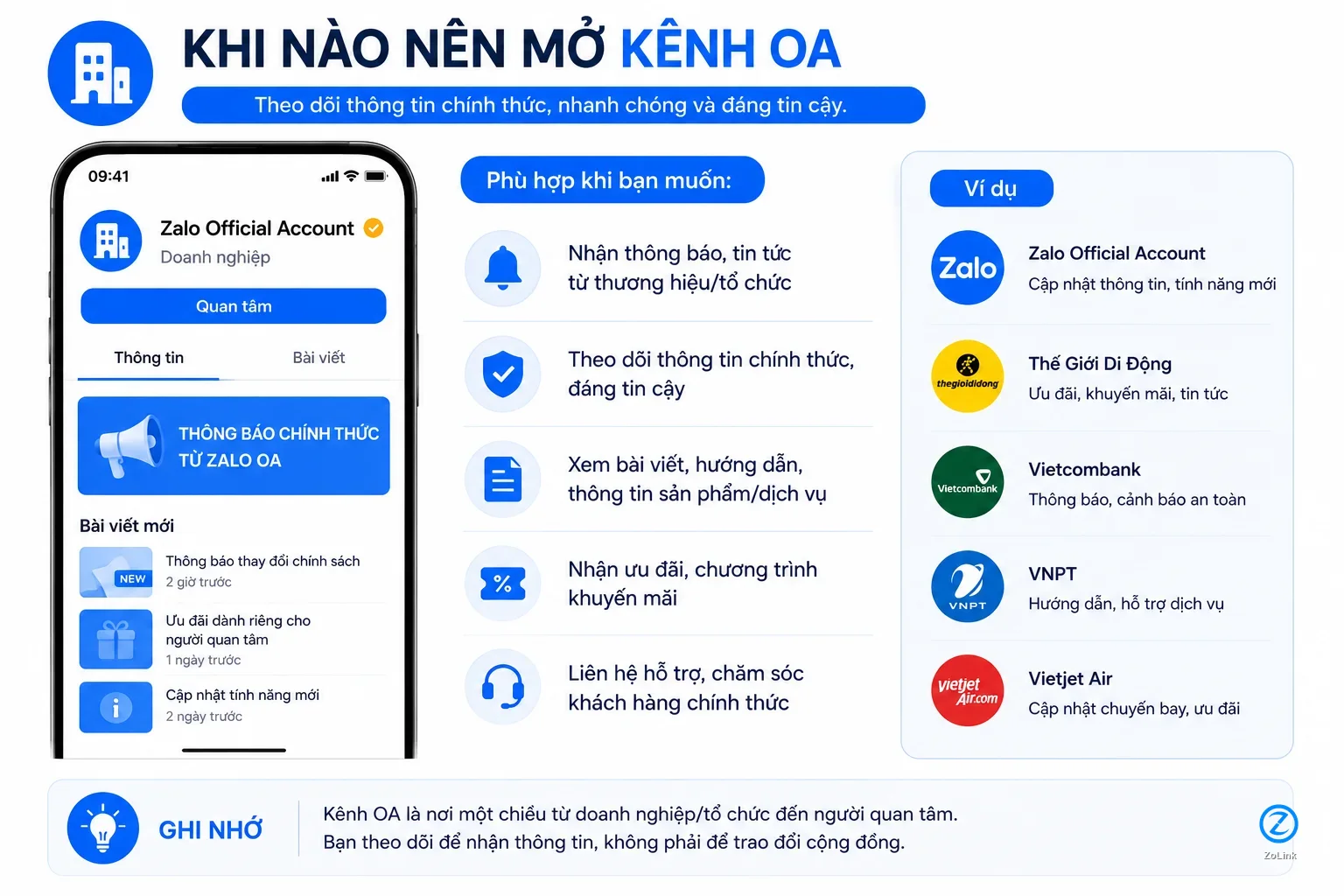
- Open an OA when you want official updates, announcements, or content from a brand, organization, or service.
- OA is better for asking information directly from a managed entity than for discussing with a community.
What a Zalo Group is and when you should join one
A Zalo Group is the right choice when you want to join a community with many people who share the same need. Users often join groups for Q&A, study, job sharing, local connections, experience exchange, buying and selling within a specific scope, or hometown networking. The main value of a group comes from interaction between members, not only from information posted by one administrator.
However, because many members can post content, you should read the description carefully before joining. A good group usually states who it is for, what content is allowed, and what is prohibited. If you are looking for communities by topic, you can start from Zalo Groups to explore groups by need, such as jobs, learning, lifestyle, entertainment, services, or local communities. The more closely a group matches your need, the more useful the experience becomes.
- Join a Zalo Group when you want to ask questions, exchange ideas, and connect with people who share the same need.
- Read the group description and rules before joining to avoid entering the wrong community.
Should you follow an OA or join a Zalo Group
If you want official announcements, choose OA. If you want to talk with a community, choose a Zalo Group. For example, a language center may have an OA for course opening dates, tuition fees, promotions, and course consultation. The same center may also have a student group for homework discussion, class Q&A, and document sharing. These two link types do not fully replace each other.
A simple way to decide is to look at your need. If you need a reliable and clearly managed information source, open the OA. If you need real experiences from many people, join the group. If you want the latest announcements, OA is usually better. If you want to ask whether others have used a service, whether a course is effective, what a neighborhood is like, or whether a job is worth applying for, a group is often more helpful.
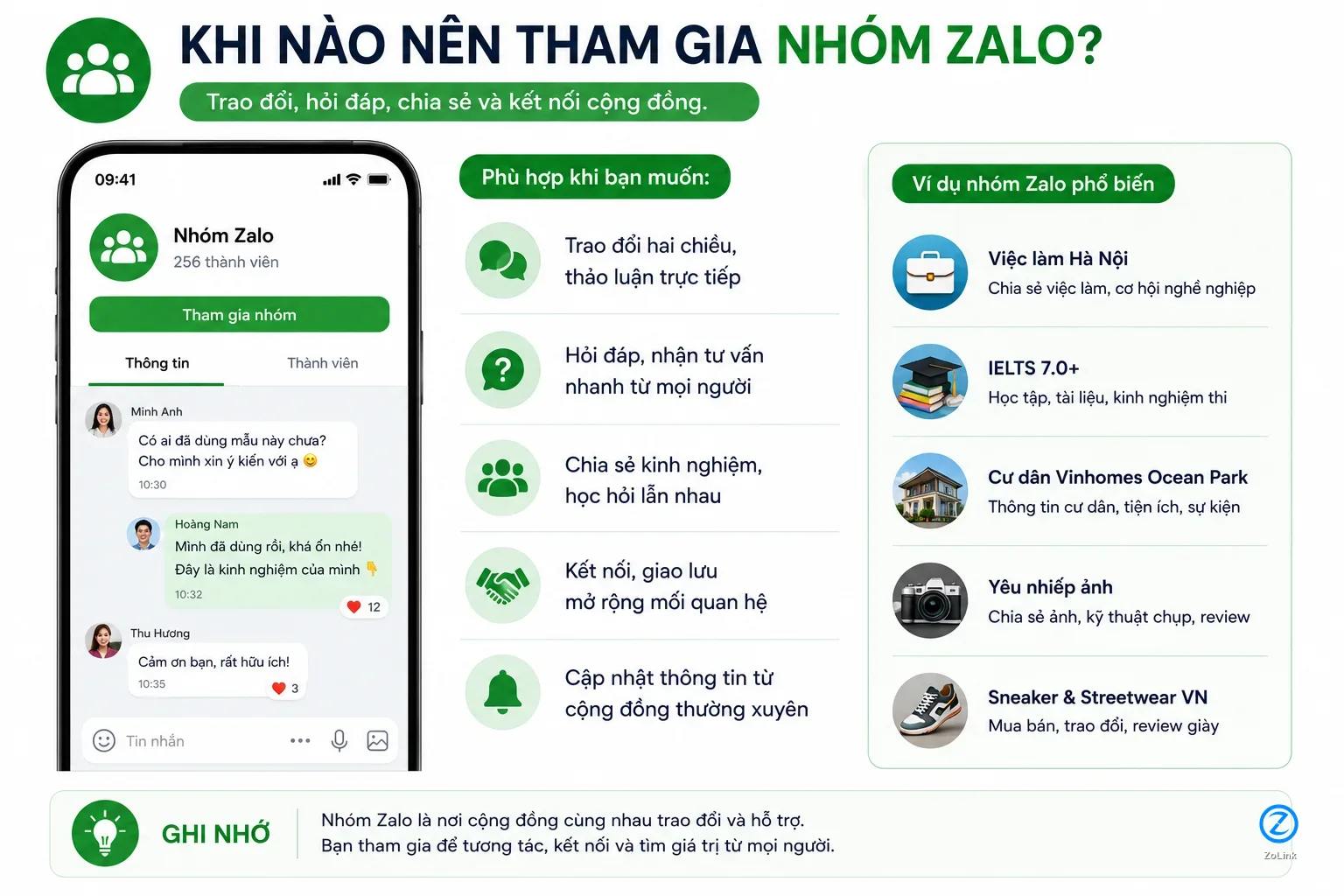
- Follow an OA when you need official, stable, and less noisy information.
- Join a Zalo Group when you need two-way discussion with people who share the same interest.
How Mini Apps differ from OA
A Mini App differs from an OA in its purpose. OA focuses on information, communication, and caring for followers. Mini Apps focus on actions. When you open a Mini App, you usually do more than read content: you may book an appointment, choose a product, view loyalty points, submit a request, check an order, book a service, fill out a form, or use a ready-made utility inside Zalo.
You can think of OA as an official channel for following and contacting an entity, while a Mini App is a small tool for completing a task quickly. A brand may have both an OA and a Mini App: the OA for announcements, consultation, and communication; the Mini App for shopping, appointment booking, or service usage. To learn more about Mini Apps from an official source, you can refer to the Zalo Mini App Platform.
- OA is for following information, receiving updates, and interacting with the managing entity.
- Mini Apps are for utility actions such as booking, searching, shopping, submitting requests, or using services.
When you should use a Zalo Mini App
You should use a Mini App when the link leads to a clear utility and you need to complete an action right away. For example, you may want to book a medical appointment, reserve a table, view a menu, buy a product, check an order, view membership points, submit a registration form, make a payment, or use a digital service. In these cases, a Mini App is often more convenient than messaging through an OA or asking inside a group because the steps are organized into a clear flow.
Still, before opening a Mini App, you should check the utility name, provider, and purpose. If a link only asks you to open it without explaining what the utility does, be cautious. For utilities shared in a directory, you can view Mini App to recognize links used for service actions, which are different from OA follow links or group invite links.
- Use a Mini App when you need to complete a specific action instead of only reading information or chatting.
- Before opening one, check the Mini App name, purpose, and provider.
How to identify the right link type before opening it
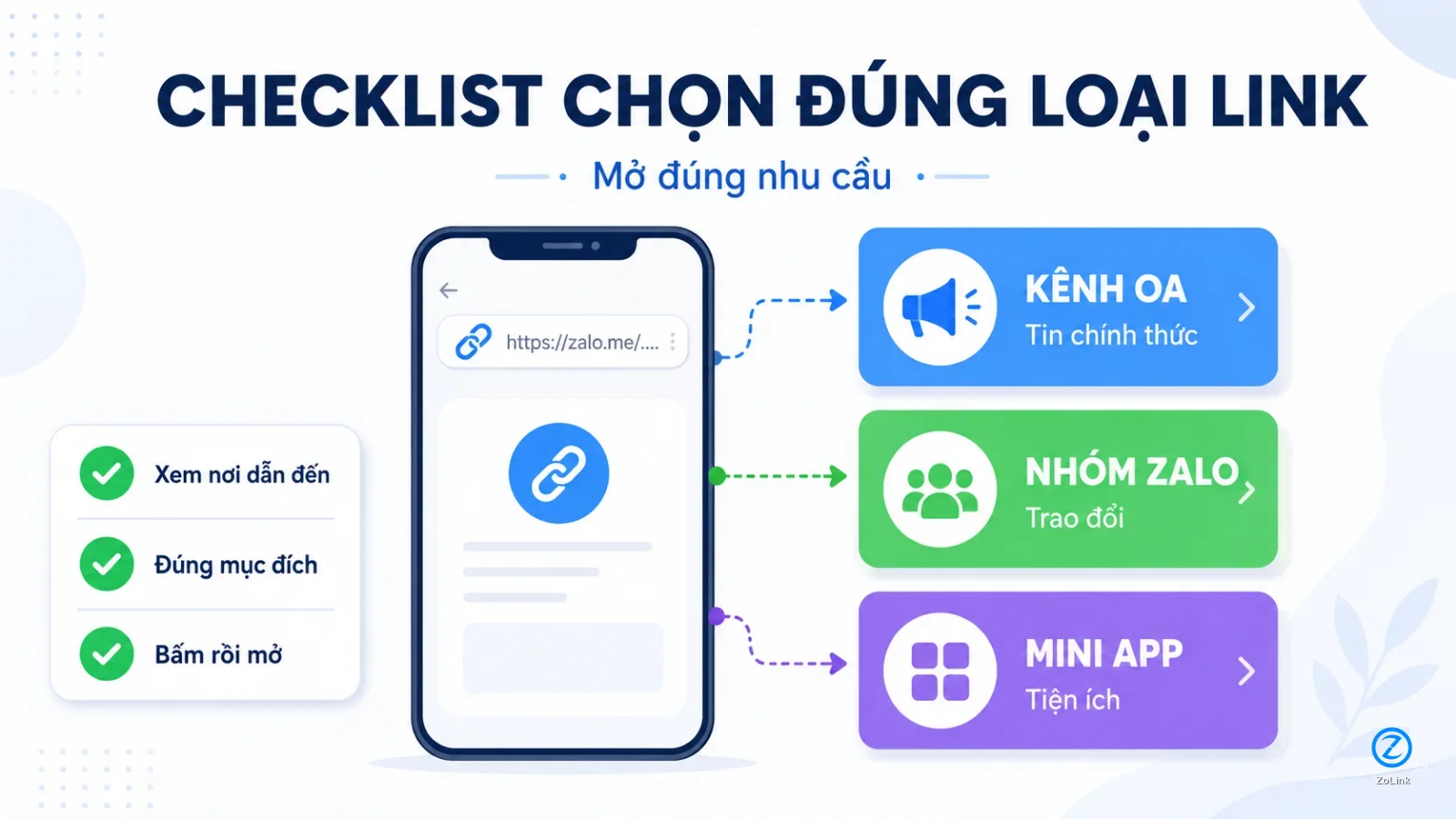
Before opening a Zalo link, ask what the link claims to offer. If it asks you to follow, receive announcements, or view an official channel, it is likely an OA. If it invites you to join for conversation, Q&A, document sharing, or connecting with other members, it is usually a Zalo Group. If it invites you to use a utility, book something, search something, or complete a service action, it may be a Mini App.
You should also read the description attached to the link. A trustworthy link usually explains where it leads, who it is for, and what you can do after opening it. Be careful with links that are vague, overpromising, or do not mention a managing entity. When you need to find the correct type of link again, you can use the search page to search by channel name, group name, Mini App name, or related topic.
- OA links usually relate to official information, group links relate to community participation, and Mini App links relate to utility actions.
- The clearer the description is, the easier it is to know whether you are opening the right type of link.
Conclusion on choosing the right link to open
Zalo OA, Zalo Groups, and Mini Apps are not three different names for the same thing. OA is suitable when you need an official information source and a contact channel for an entity. Zalo Groups are suitable when you need a community for discussion, Q&A, and sharing. Mini Apps are suitable when you need to perform a utility action inside Zalo. Choosing the right link saves time and helps you avoid opening the wrong place.
A quick way to remember it is: follow information with OA, exchange with others in a group, and complete actions through a Mini App. Before opening any link, read the link name, description, managing entity, and stated purpose. A few seconds of checking can help you find the right information, the right community, or the right utility.
- OA is for following, Zalo Groups are for discussion, and Mini Apps are for actions.
- Users should read the description and purpose of a link before opening it to avoid choosing the wrong link type.