
How to Submit a Zalo Link to ZoLink
If you have a Zalo Group, Zalo community, OA Channel, or Mini App link that you want to submit to ZoLink, start by preparing the original link and a few basic details. The clearer your information is, the easier it is for ZoLink to review, categorize, and place your link in the right section of the directory.
ZoLink is a Zalo link directory that helps users discover Zalo Groups, communities, OA Channels, and Mini Apps by topic. So when you submit a link, you are not just sending a URL. You are helping ZoLink understand what the link is, who it is for, and where it should appear.
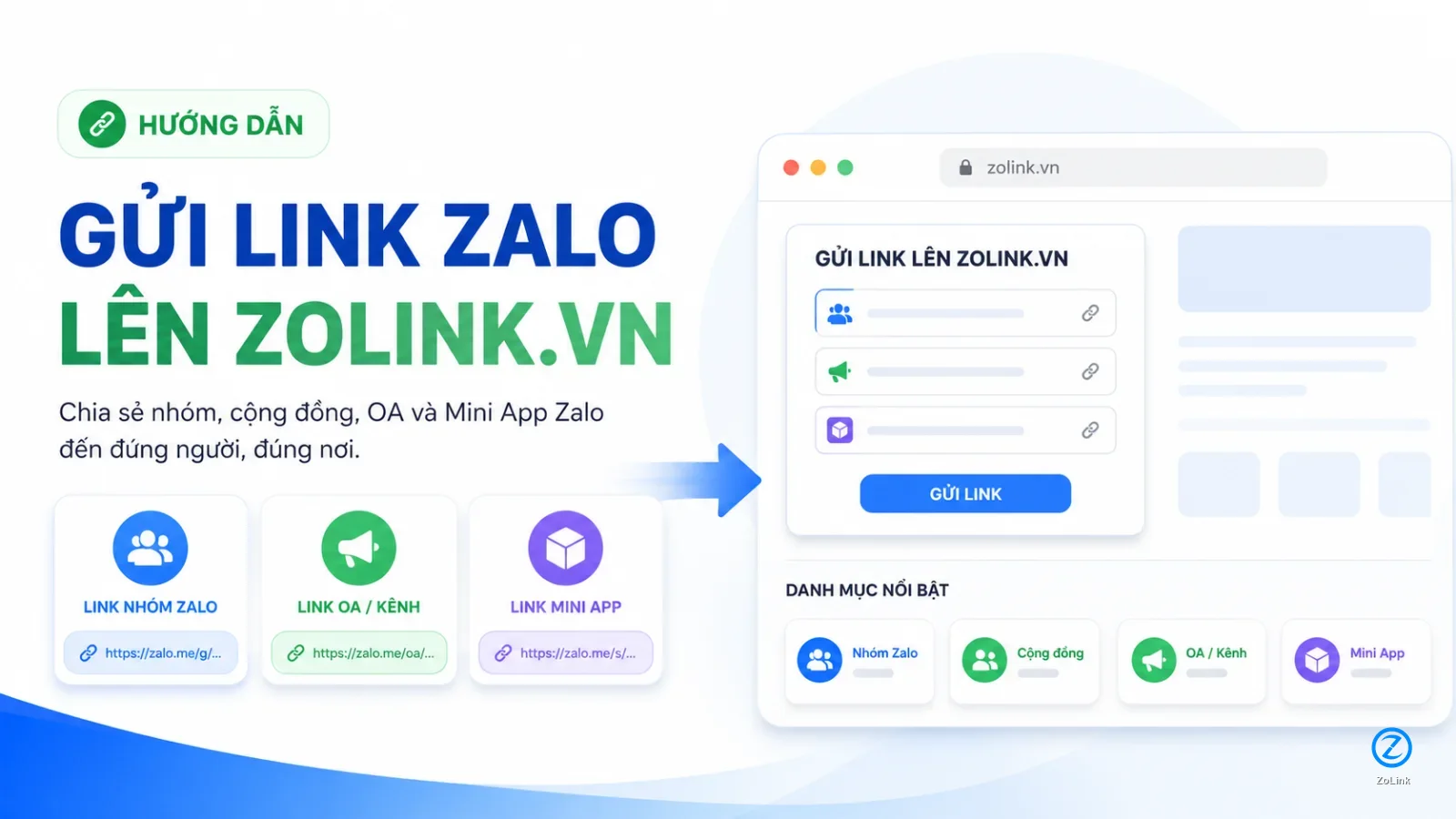
When should you submit a link to ZoLink?
You should submit a link to ZoLink when you want to:
- Suggest a Zalo Group or Zalo community for the directory.
- Submit an OA Channel so users can find it more easily.
- Submit a Mini App for review and categorization.
- Add a clear display name, description, and category to a Zalo link.
- Help users find the right group, channel, or app based on their needs.
If you only need a short URL to share right away, use the link shortener. If you want your link to be reviewed more carefully and potentially appear in the public directory, use the full link submission form.
What to prepare before submitting a link
Before submitting your link to ZoLink, prepare:
- The original Zalo Group, Zalo community, OA Channel, or Mini App link.
- A clear display name that closely matches the real name of the group, channel, or app.
- A preferred short link slug, if you want to create an easy-to-remember ZoLink URL.
- The most relevant category.
- A short description explaining who the link is for and what it is about.
Do not submit impersonation links, spam links, scam links, expired links, or links with risky or policy-violating content. These links may not be approved or shown publicly.
How to submit a Zalo link to ZoLink
Step 1. Paste the original Zalo link into the form
In the first field, paste the original Zalo link you want to submit. This can be a Zalo Group, Zalo community, OA Channel, or Mini App link.
Example Zalo Group link:
https://zalo.me/g/godvjpozrm4q05ifc6y3Example OA Channel link:
https://zalo.me/12842736403457782348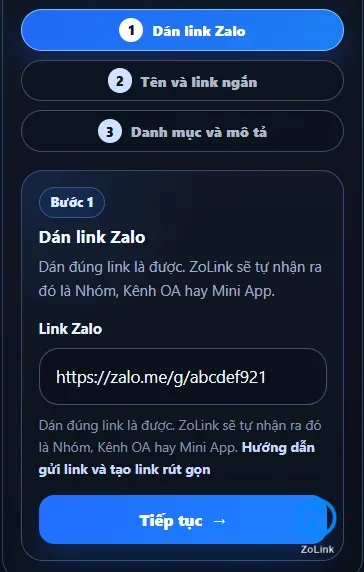
Check the link before submitting it. If the original link has expired, has restricted access, or cannot be opened, ZoLink may not be able to review and categorize it correctly.
Step 2. Add a display name and short link
After pasting the original link, add a display name. This is the name users will see in the ZoLink directory, so it should be short, clear, and close to the real name of the group, channel, or app.
For example, if you are submitting a Zalo Group named Shop Xinh, the display name should be:
Shop XinhIf you want a memorable short link, you can use a slug like:
shop-xinhYour short link may then look like this:
https://zolink.vn/shop-xinhIf the link is for the Shop Xinh OA Channel, use a more specific slug:
kenh-oa-shop-xinhThe short link may then look like this:
https://zolink.vn/kenh-oa-shop-xinh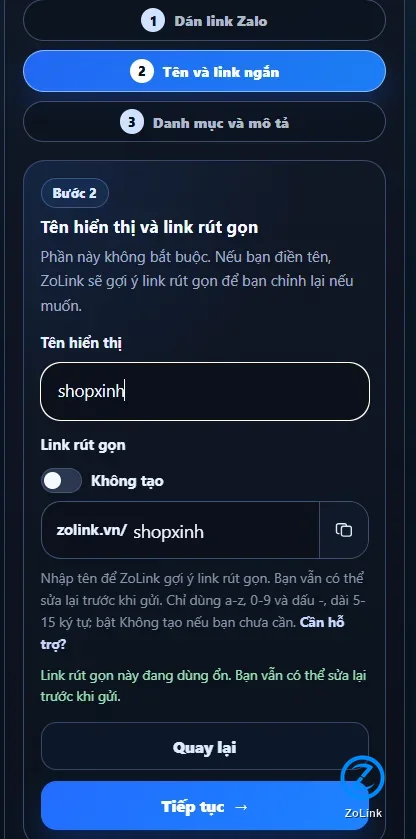
The display name should match the real content as closely as possible. The short link should be lowercase, readable, and directly related to the link.
Good examples:
Shop Xinh
Vietnam Marketing Community
Shop Xinh OA Channel
Service Booking Mini App
Poor examples:
Good group
New link
Zalo 123
Test group
Best community
Generic names make it harder for users to understand what the link is about and make it harder for ZoLink to categorize the link accurately.
Step 3. Choose a category, write a description, and submit
In the final step, choose the most relevant category and write a short description. This part matters because ZoLink is a topic-based Zalo link directory, not just a place to store URLs.
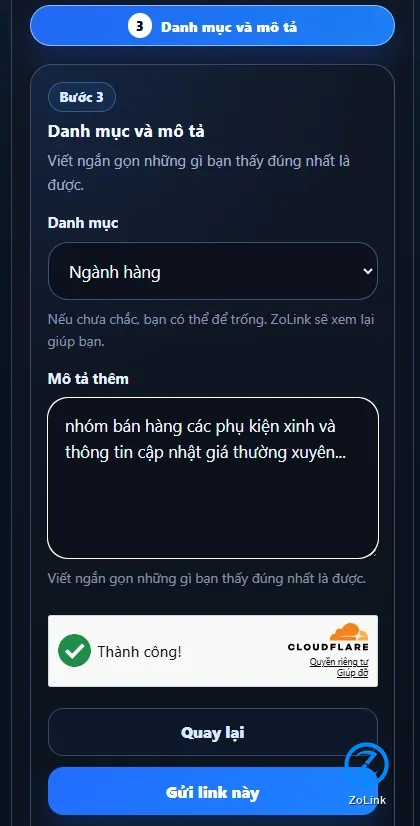
Choose the category that best matches the real content of the Zalo Group, OA Channel, or Mini App. If you are not sure which category fits best, choose the closest option and write a clearer description so ZoLink has more context for review.
A good description only needs a few lines, but it should answer these questions:
- Who is this link for?
- What is the main topic?
- What will members, followers, or users get from it?
- Is there anything important about the location, industry, product, or topic?
Good description example:
A Zalo Group for people interested in women’s fashion, new arrivals, promotions, and product recommendations from Shop Xinh. Suitable for customers who want to follow new products and special offers.Poor description example:
Good group, join now.Most Zalo Groups and communities have very little description, or no clear description at all. Adding a few useful lines helps users understand the link faster. ZoLink may also help refine the description and suggest better categorization based on the information you provide.
For a better description, see: How to write a Zalo Group description that is easier to find.
If you are unsure which category to choose, see: How to choose the right category for a Zalo Group.
After completing the category and description, review everything once more and submit the link.
Will my submitted link appear immediately?
Not every submitted link appears in the public directory immediately.
After submission, ZoLink may review the link based on several factors, such as:
- Whether the link can be opened.
- Whether it is a Zalo Group, OA Channel, or Mini App.
- Whether the display name is clear.
- Whether the description matches the actual content.
- Whether the category is appropriate.
- Whether the link shows signs of spam, impersonation, or risky content.
The more complete and accurate your information is, the better the chance that the link can be categorized properly.
What is the difference between shortening a link and submitting a link?
| Need | Recommended option |
|---|---|
| Turn a long Zalo link into a short URL for immediate sharing | Shorten link |
| Create a link like zolink.vn/shop-xinh | Shorten link |
| Submit a Zalo Group, OA Channel, or Mini App to the ZoLink directory | Submit link |
| Let ZoLink review, categorize, and potentially display the link publicly | Submit link |
| Add a display name, description, and category | Submit link |
In short: shortening a link creates a clean, shareable URL. Submitting a link suggests a Zalo Group, OA Channel, or Mini App for the ZoLink directory.
How to track your submitted link
After submission, ZoLink may return a notification or tracking code. If supported, you can use the tracking code or paste the original Zalo link again to check its review status.
While waiting for review, keep a copy of:
- The original Zalo link.
- The short link, if one was created.
- The display name you entered.
- The tracking code, if available.
If the original Zalo link changes, expires, or stops working later, you should update it to avoid sending users to a broken link.
Tips to help your link get categorized correctly
To improve the chance of accurate review and categorization, you should:
- Paste the correct original link.
- Use a display name close to the real name.
- Avoid misleading names.
- Choose the closest matching category.
- Write at least 2 to 3 useful sentences.
- Explain who the group, channel, or app is for.
- Avoid spam, impersonation, and risky content.
A link with a clear name, useful description, and accurate category is much more valuable than a bare URL with no context.
Frequently asked questions
Can I submit a Zalo Group to ZoLink?
Yes. You can submit a Zalo Group or Zalo community if the link is valid and still active.
Can I submit an OA Channel?
Yes. ZoLink supports OA Channel submissions for review and categorization in the directory.
Can I submit a Mini App?
Yes. If the Mini App has a valid public link, you can submit it to ZoLink for review.
Do I need to write a description?
Yes, it is recommended. A description helps ZoLink understand who the link is for, what it is about, and which category it belongs to.
What if I do not know which category to choose?
Choose the closest matching category and write a clearer description. ZoLink may review the information and suggest a more suitable category.
Will my link appear in the directory right after submission?
Not necessarily. Links may need to be reviewed, categorized, and checked for suitability before appearing publicly.
Conclusion
Submitting a link to ZoLink helps your Zalo Group, Zalo community, OA Channel, or Mini App get reviewed, categorized, and potentially listed in the Zalo link directory.
The process is simple:
- Paste the original Zalo link.
- Add a display name and short link.
- Choose a category, write a description, and submit.
If you only need a short URL for quick sharing, use the link shortener. If you want your link to be understood, categorized, and potentially listed in the ZoLink directory, submit the full link with a clear display name, relevant category, and useful description.
````