
How to Shorten a Zalo Link on ZoLink
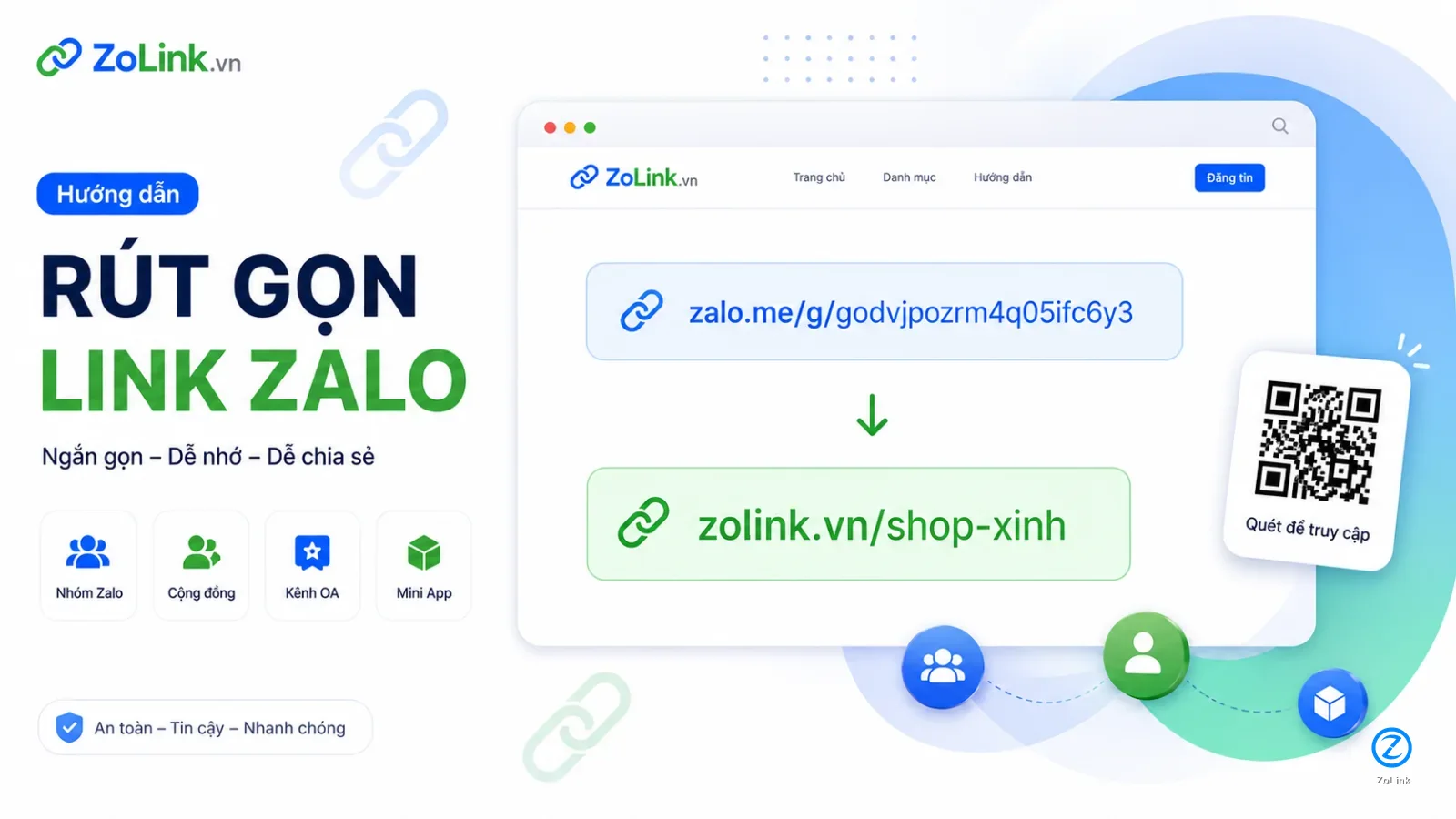
If you have a Zalo Group, Zalo community, Zalo Official Account (OA) or Mini App link that you want to share more neatly, you can use ZoLink to create a short, memorable and easy-to-share URL.
For example, a long Zalo Group link such as:
https://zalo.me/g/godvjpozrm4q05ifc6y3can be shortened to:
https://zolink.vn/shopxinhA short link helps people quickly understand what the link is about. It also looks cleaner when shared in messages, posts, QR codes, social media bios, sales materials or community introductions.
What does it mean to shorten a Zalo link?
Shortening a Zalo link means turning a long, hard-to-remember Zalo URL into a shorter ZoLink URL.
For example:
https://zalo.me/g/godvjpozrm4q05ifc6y3can become:
https://zolink.vn/shopxinhWhen someone clicks the short link, ZoLink redirects them to the original Zalo link. This makes the URL cleaner, easier to remember and more professional when shared.
What types of Zalo links can ZoLink shorten?
You can use ZoLink to shorten common types of Zalo links, including:
- Zalo Group links.
- Zalo community links.
- Zalo Official Account links.
- Zalo Mini App links.
- Public Zalo links with a valid format.
Examples of shortened links:
https://zolink.vn/shopxinh
https://zolink.vn/kenh-oa-shopxinh
https://zolink.vn/nhom-order-hang
https://zolink.vn/miniapp-dat-lich
When should you shorten a Zalo link?
You should shorten a Zalo link when:
- The original Zalo link is too long, hard to remember or visually messy.
- You want a short URL to send to customers, members or your community.
- You need to place the link in a post, video description, social bio, document or QR code.
- You want the short link name to reflect the real content of the group, OA or Mini App.
- You want your shared link to look clearer and more professional.
For example, if you have a Zalo group named Shop Xinh, this link:
https://zolink.vn/shopxinhis much easier to remember and understand than a long Zalo URL.
How to shorten a Zalo link on ZoLink
Step 1. Paste the Zalo link you want to shorten
Go to ZoLink and paste your original Zalo link into the link shortening box.
Example Zalo Group link:
https://zalo.me/g/godvjpozrm4q05ifc6y3Example Zalo Official Account link:
https://zalo.me/12842736403457782348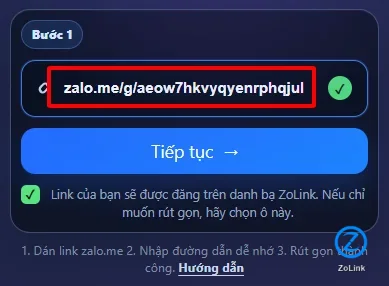
Tip: Before shortening the link, check that the original Zalo link is active and points to the correct destination.
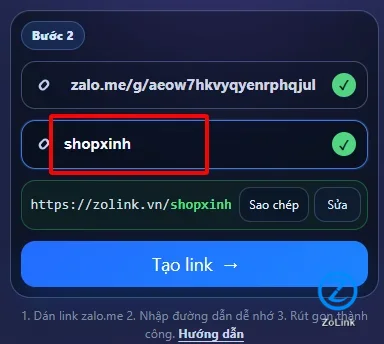
Step 2. Enter an easy-to-remember short name and click shorten
After pasting the original Zalo link, enter the short link name you want to use. The name should be short, readable, relevant and written without accents.
For example, if your Zalo group is named Shop Xinh, you can enter:
shopxinhYour short link may then become:
https://zolink.vn/shopxinhIf it is the Official Account of Shop Xinh, you can make the name clearer:
kenh-oa-shopxinhAfter entering the short name, click Shorten to create your link.
A good short link name should be based on the group name, brand, topic or main function.
Good examples:
shopxinh
kenh-oa-shopxinh
nhom-order-hang
viec-lam-da-nang
miniapp-dat-lich
Avoid names such as:
abc
test
link-moi
nhom1
zalo123
Generic names are harder to remember and do not help people understand where the link will lead.
Step 3. Complete the process and get your shortened link
If the Zalo link is valid and the short name has not been used, ZoLink will create your shortened link successfully. You will see a confirmation message and can copy the new link for immediate use.
Example shortened link:
https://zolink.vn/shopxinh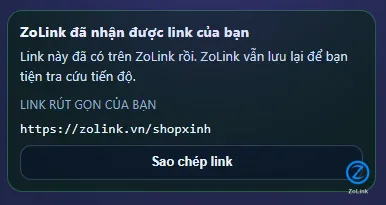
You should open the short link once before sharing it widely to make sure it redirects to the correct Zalo Group, Official Account or Mini App.
How to choose a memorable short link name
A good short link name should help people understand the destination before they click. You can name it after the brand, group name, topic, location or link type.
For a Zalo Group
shopxinh
nhom-order-hang
viec-lam-ha-noi
hoc-excel-online
cong-dong-marketing
For a Zalo Official Account
kenh-oa-shopxinh
oa-shopxinh
kenh-oa-uu-dai
oa-cham-soc-khach-hang
For a Mini App
miniapp-dat-lich
miniapp-tich-diem
dat-lich-dich-vu
tra-cuu-bao-hanh
For a local community
viec-lam-da-nang
mua-ban-ha-noi
an-uong-can-tho
bat-dong-san-hcm
Notes when shortening Zalo links
To keep your short link clear, safe and trustworthy, you should:
- Paste the correct original Zalo link.
- Avoid using expired or inaccessible links.
- Avoid short names that may mislead users about the real destination.
- Do not use names that impersonate another brand, organization or person.
- Do not use shortened links for spam, scams or unsafe content.
- Check the short link after it has been created.
For example, if the link leads to a small buying and selling group, you should not name it like the official support channel of a major brand. That kind of name can mislead users and may be reported.
Common issues when shortening Zalo links
The original Zalo link is invalid
If the link has the wrong format or is not a supported Zalo link, ZoLink may not be able to create a short link. Check the original URL and try again.
The original link is expired or no longer accessible
Some Zalo Group links may expire, the group may be closed, or access may be restricted. In this case, get a new valid link before shortening it.
The short link name is already taken
If your preferred short name has already been used, choose a clearer alternative.
Examples:
shopxinh-official
shopxinh-zalo
shopxinh-group
kenh-shopxinh
The short link name is too generic
Names such as test, abc, link, nhom or zalo123 are hard to remember and do not clearly describe the link destination.
Will a shortened link automatically appear in the ZoLink directory?
No. A shortened link is created so you can share it more easily. Whether it appears in the public ZoLink directory depends on review, classification and content suitability.
ZoLink is a directory for Zalo Groups, Zalo communities, Official Accounts and Mini Apps. If you want your link to have a chance of appearing publicly in the directory, provide complete information such as display name, category and a short description.
Frequently asked questions
Can I use a shortened Zalo link immediately?
Yes. Once the link is created successfully, you can copy and share it right away.
Does a ZoLink short link replace the original Zalo link?
No. The short link only makes the URL easier to remember and share. When someone clicks it, ZoLink redirects them to the original Zalo link.
Can I shorten a Zalo Group link?
Yes. You can shorten a Zalo Group link as long as the original link is valid and still active.
Can I shorten a Zalo Official Account link?
Yes. You can shorten a Zalo Official Account link to create a cleaner and more memorable URL.
Example:
https://zolink.vn/kenh-oa-shopxinhCan I shorten a Zalo Mini App link?
Yes. If the Mini App link is valid, you can use ZoLink to create a shorter link and share it more easily.
How should I name my short link?
Choose a name that is short, readable, relevant and written without accents.
Examples:
shopxinh
kenh-oa-shopxinh
miniapp-dat-lich
viec-lam-da-nang
Conclusion
Shortening a Zalo link on ZoLink helps you turn long and hard-to-remember Zalo Group, community, Official Account or Mini App links into cleaner, easier-to-share URLs.
You only need 3 steps:
- Paste the Zalo link you want to shorten.
- Enter an easy-to-remember short name and click shorten.
- Complete the process, get your shortened link and copy it for sharing.
Example:
https://zalo.me/g/godvjpozrm4q05ifc6y3can be shortened to:
https://zolink.vn/shopxinhIf you need a short link for messages, posts, QR codes or documents, ZoLink’s link shortener is a simple and practical option.