The common problem: the link is still online, but the group is no longer useful
When you search for Zalo groups online, you will often find links copied from old posts, old comments, shared documents, or forwarded messages. At first glance, the link may appear to match what you need: a job group, study group, shopping group, local community, or overseas Vietnamese group. But after opening it, the reality can be very different: the link no longer works, the group is full, the group is inactive, or worse, it has turned into a place for ads, spam, or unclear collaborator recruitment.
That is why users do not only need to find groups quickly; they need to find Zalo groups that are still active and still relevant. An active group is not simply a group that still exists. It should have recent content, real interaction, an accurate description, some form of admin management, and a topic that has not drifted away from its original purpose. Without a quick check, you can easily waste time on groups that look useful from the outside but no longer provide value.
- Old group links may be broken, expired, or no longer point to the group described.
- A group can still exist but be effectively dead if there is no real activity.
- Groups that change topic are often more misleading than broken links because users may join them by mistake.
Know the difference: broken links, full groups, dead groups, spam groups, and topic drift
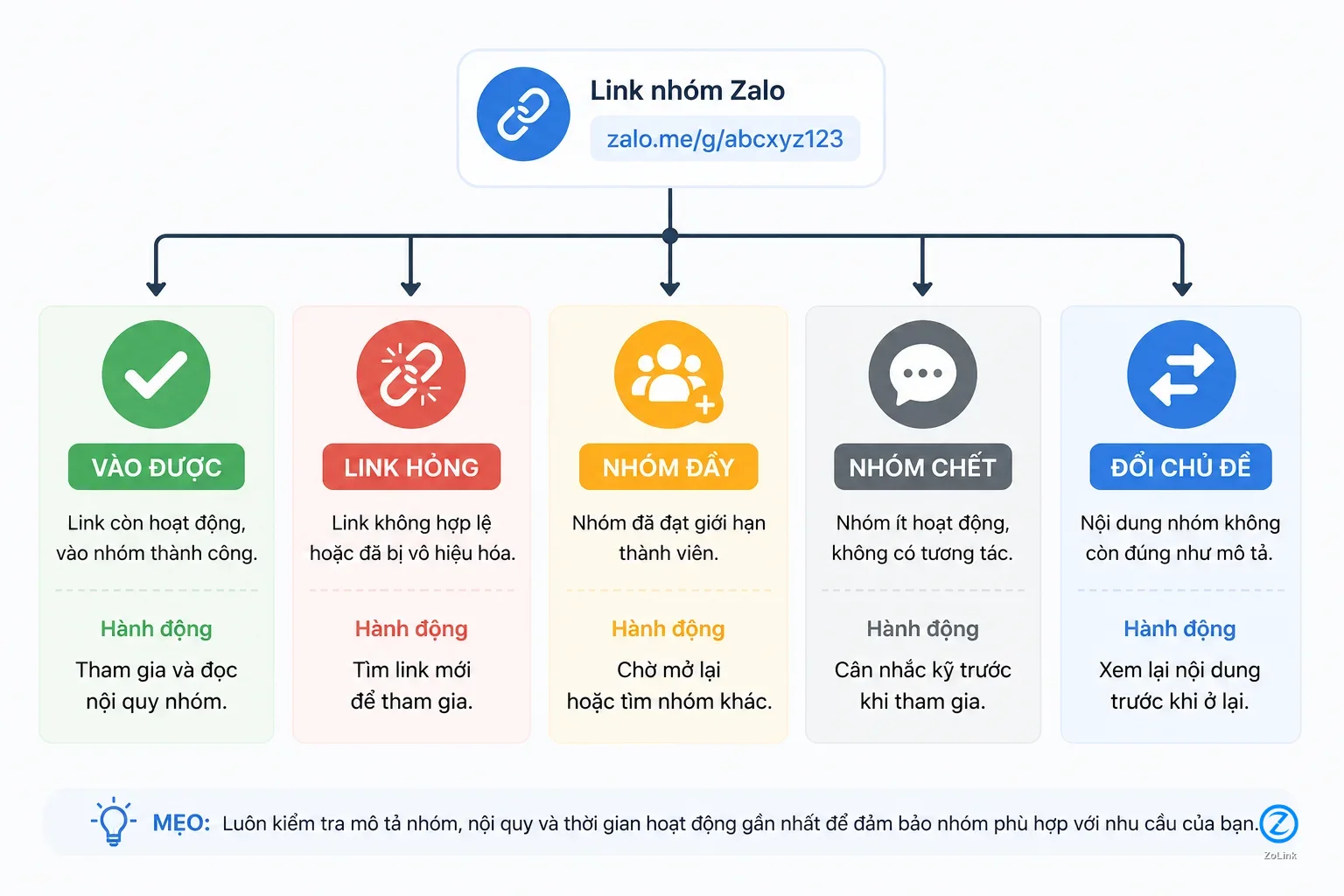
Before judging a group, it helps to separate the most common cases. A broken Zalo group link means you tap the link but cannot open it, cannot join, or receive a notice that the invitation is no longer valid. A Zalo group link may also fail because the group has reached its member limit, the admin has changed the joining permissions, the old invite link has been replaced, or the person sharing it posted the wrong URL.
A dead Zalo group is a group you can still enter, but almost no one is actually talking. The latest message may be weeks or months old, questions receive no answers, admins are absent, and pinned information is outdated. A spam group is different: it still has new messages, but the activity is low quality and off-purpose, such as repeated ads, suspicious links, unclear job offers, or mass sales posts. A group that has changed topic may once have been useful, but now discusses something entirely different from its original name.
- Broken link: the link does not open or is no longer valid.
- Full group: the link is real, but new members cannot join.
- Dead group: the group still exists, but practical discussion has stopped.
- Spam group or topic-shifted group: there are new messages, but they no longer match your need.
Before tapping the link, check where it came from
A reliable group link is usually shared with enough context: a clear topic, a consistent group description, a reasonably recent update date, and not simply dumped into a long unfiltered list. On the other hand, if you see a page or message containing dozens of links with no description, no update date, and no indication of who each group is for, proceed carefully. Those lists are much more likely to contain dead links or groups that have changed their content.
Before opening a link, read the text around it. Why was this group shared? Is it for study, shopping, jobs, a local community, or a hometown network? Does it mention a province, industry, school level, target audience, or current activity status? If the only promotion is vague wording such as “join to make money,” “enter now before the chance disappears,” or “hot link today,” that is not a good signal.
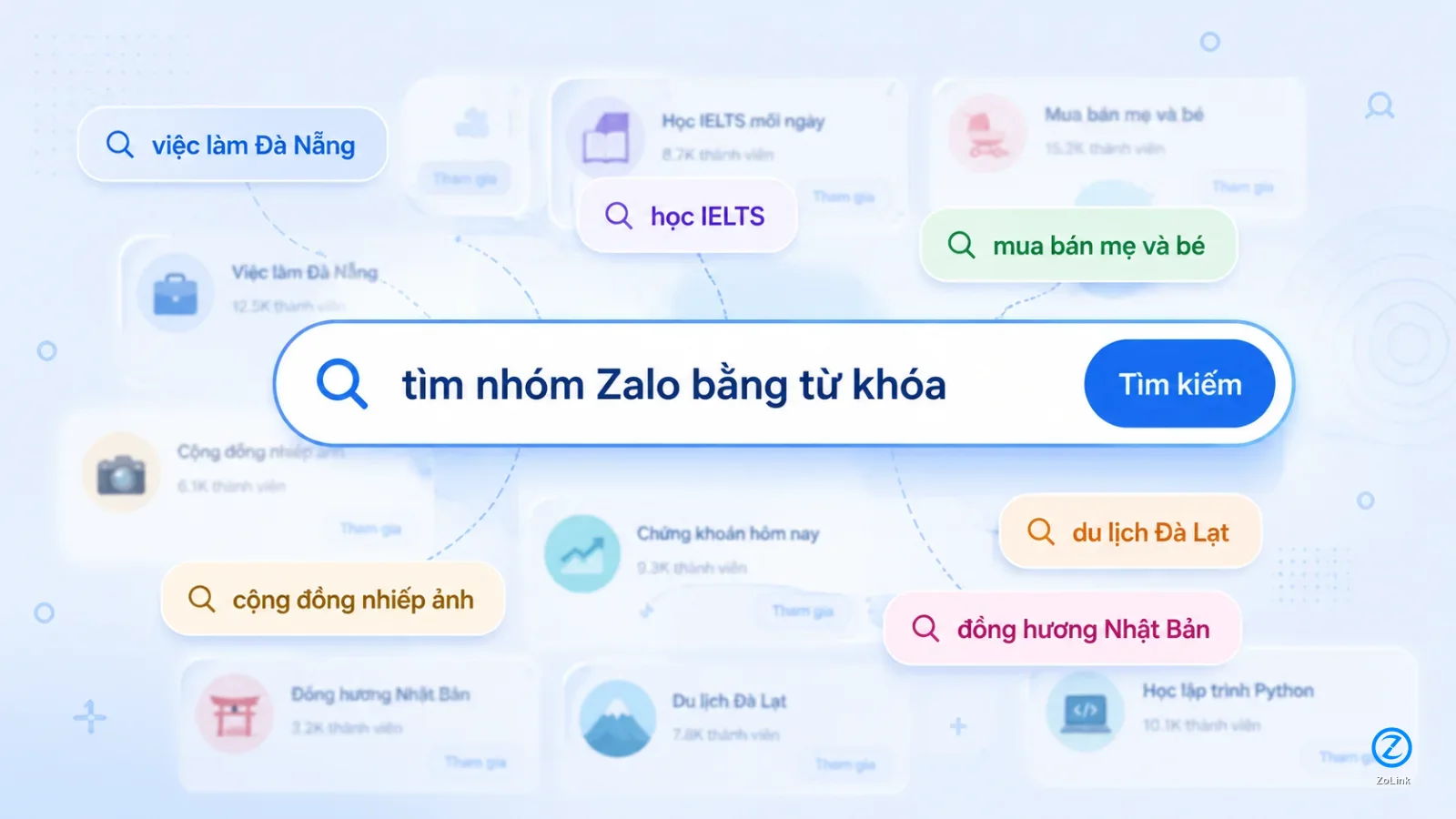
If you need to search by a specific need, the Zalo group search page can help you filter by keyword instead of clicking scattered links with unclear sources.
- Prioritize links with a clear topic, location, and intended audience.
- Be careful with long link lists that have no update date or category labels.
- Avoid links promoted with exaggerated promises but little concrete information.
After opening the link, pause at the preview screen
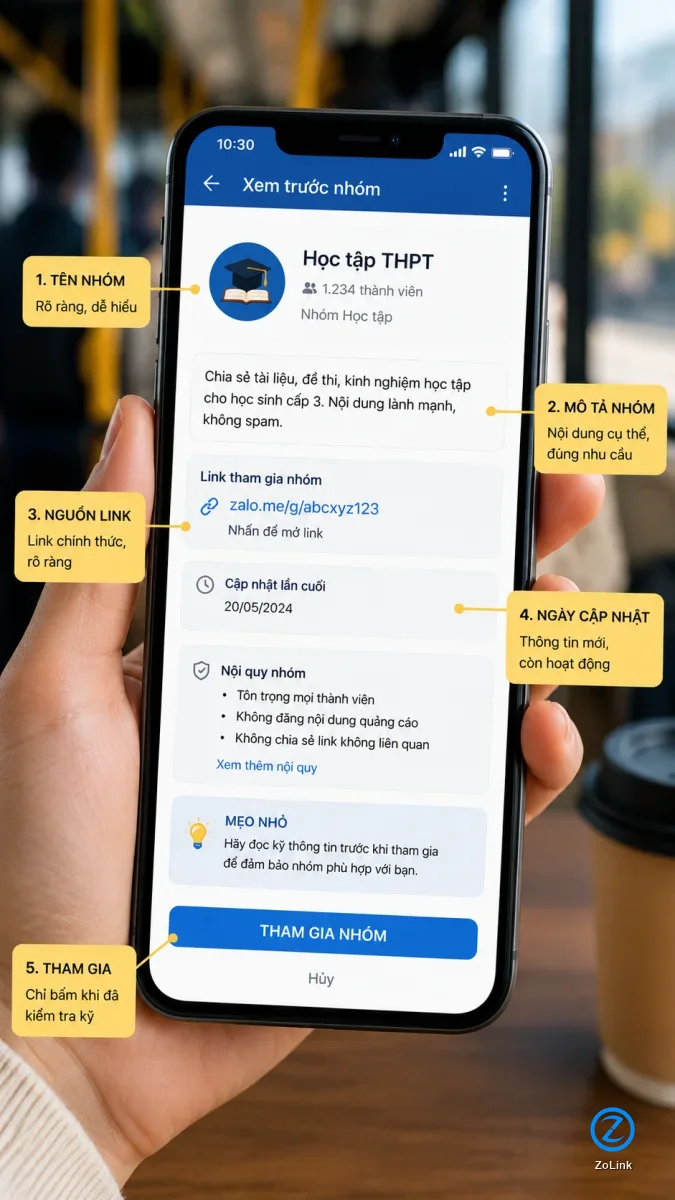
Many people see the join button and tap it immediately. But a few seconds on the preview screen can save you from joining the wrong group. Look at the group name, profile image, short description, member count if available, and the way the group introduces itself. These details can tell you whether the group still matches what you were looking for.
For example, if you are looking for a job group but the group name includes words related to investment, gifts, online tasks, or unusually high-income collaborator work, stop and reconsider. If you are looking for a study group but the description mostly pushes courses, redirects people to another channel, or asks users to inbox privately, it is also worth being cautious. A genuinely useful active Zalo group should make its purpose clear: who it is for, what members discuss, and why joining makes sense.
If the preview has no description, a very generic group name, or an unrelated profile image, that does not automatically mean the group is unsafe. But it does mean you should inspect the group more carefully if you decide to enter.
- Read the group name and description before joining.
- Compare your purpose with how the group presents itself.
- Be cautious with phrases such as high income, rare opportunity, join now, or free rewards when details are unclear.
Once inside, the first three minutes are enough to judge the group
After joining, you do not need to stay for long before forming a first impression. In the first three minutes, look at the latest messages, the number of people actually interacting, pinned content, and how members respond to each other. If the newest message is old, real questions are ignored, or everything looks automated, the group may be dead even if it still has members.
An active group usually has very ordinary but useful signs: a newcomer asks and someone replies, recent content stays on topic, admins occasionally remind members of the rules, and people share real experience or contextual information. The group does not need to be active every minute of the day. What matters is that when discussion happens, it is relevant and someone responds.
A group with many new messages is not automatically a good group. If the latest 20 messages are mostly ads, shortened links, repeated product images, or unrelated content, that is spam activity, not useful activity.
- Check the latest message and the gaps between conversations.
- See whether real questions receive real answers.
- Read pinned content to know whether admins still manage the group.
- Separate genuinely active groups from groups that are only noisy with spam.
Topic drift is the hardest problem because it is easy to miss
A broken link is obvious: it simply does not work. A dead group is also fairly easy to spot when there are no new messages. A Zalo group that has changed topic is more frustrating because it can still look active. The name may still say “jobs,” “English learning,” “local community,” or “mother-and-baby marketplace,” while the actual content has shifted to mass selling, traffic farming, unclear collaborator recruitment, games, finance, or unrelated promotions.
The clearest sign is the mismatch between the group name and the latest 10 to 20 messages. If the name suggests study but recent posts sell software, if the name suggests a local community but the posts are nationwide link dumps, or if the name suggests jobs but most posts involve vague online tasks with no company details, leaving is usually the smarter choice. Topic drift wastes your time, gives you the wrong information, and may expose you to risky links.
For Vietnamese people overseas, topic drift is also common in older hometown or expat groups. A group may have started as a place to ask about paperwork, housing, jobs, or daily life in a specific city. Over time, if it is no longer moderated, it can become a general ad board. Do not judge only by the group name; judge by what is happening inside now.
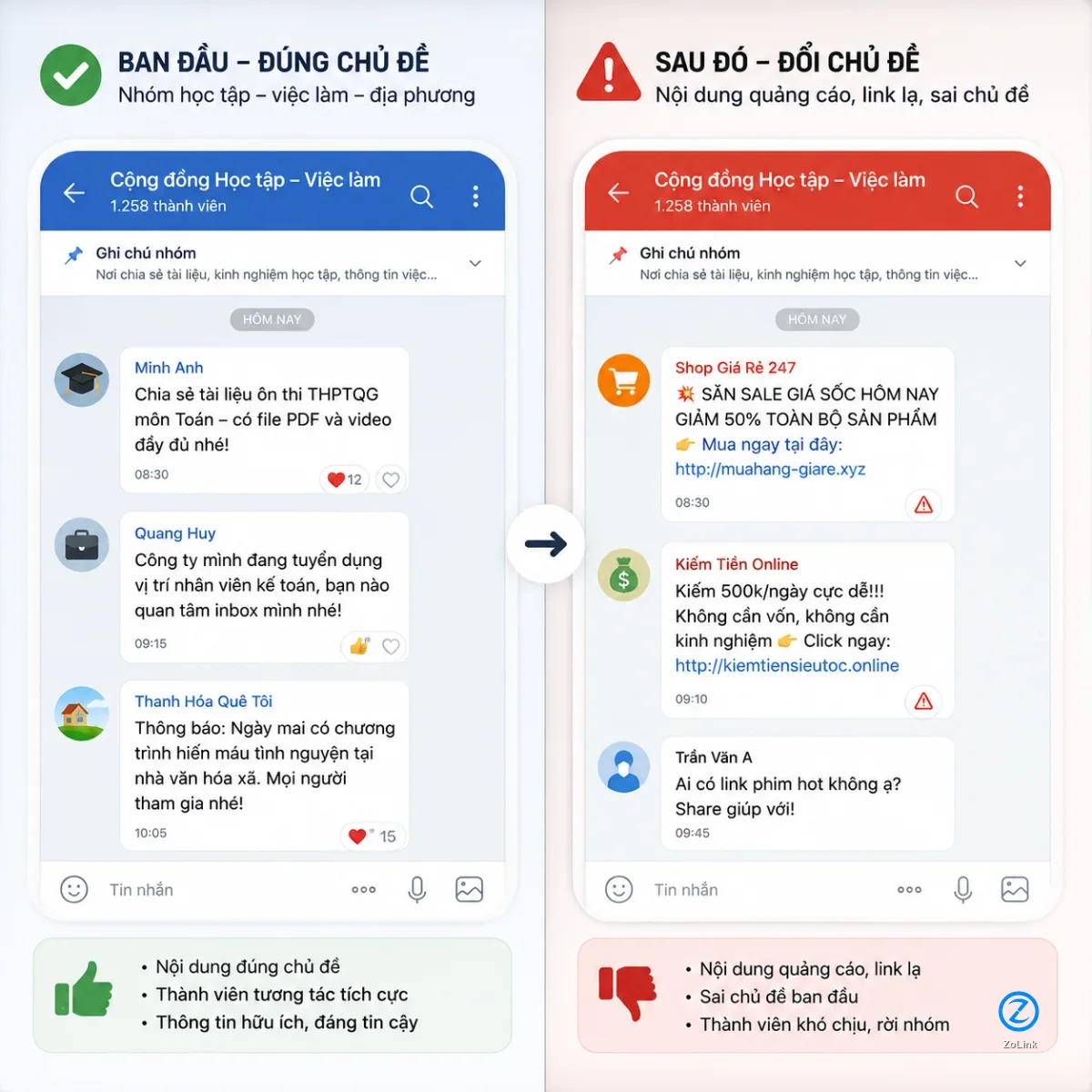
- Compare the group name with the latest 10 to 20 messages.
- Leave if the current content no longer serves the original purpose.
- Be careful when a community group turns into advertising, unclear recruitment, or suspicious link sharing.
What should you do when a Zalo group link is broken or no longer relevant?
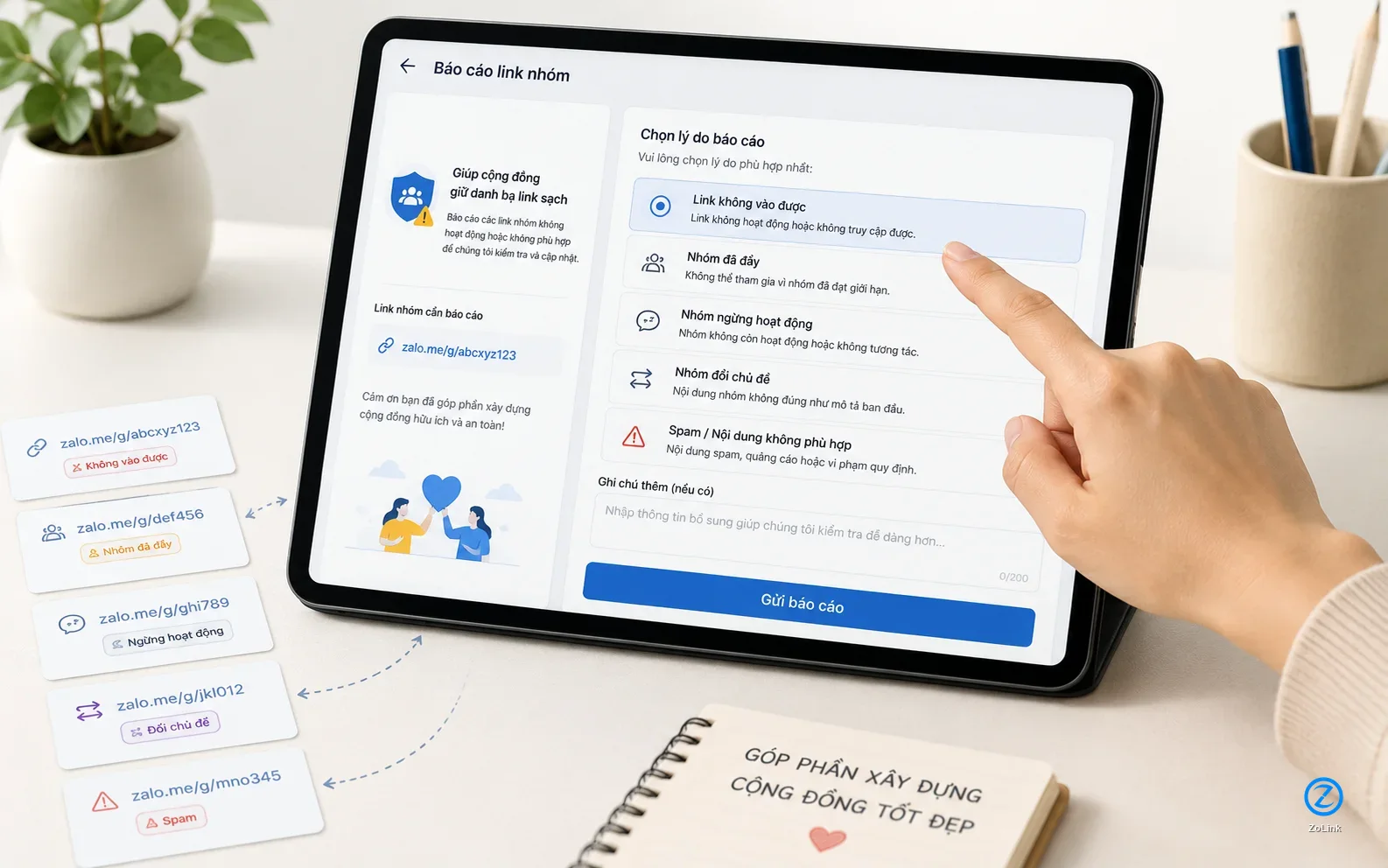
If you find a broken Zalo group link, do not keep tapping it repeatedly or install strange files or apps to make it open. The better step is to go back to the source that shared the link and check whether there is a newer version. If the link appears in a group directory, look for a report button, a broken-link option, or a contact point where you can send feedback.
If you can enter the group but it is no longer relevant, leave it instead of keeping it around. If the group shows signs of spam, scams, money transfer requests, or personal data collection, do not provide any information. If the group is simply not what you need, note why it failed so your next search can be more specific: add a location, industry, school level, interest, or community name.
If you manage a link list, keeping group status updated is essential. A broken link does not only frustrate users; it also reduces trust in the entire directory. Status labels such as “full,” “invalid link,” “inactive group,” or “changed topic” should be recorded as early as possible.
- Do not download files or install unfamiliar apps just to open a group link.
- Look for a newer version from the original source.
- Leave if the group no longer matches your need or shows risk signals.
- Report broken links so later users do not waste time.
How cleaner group directories help the next user
A useful group directory is not just a place with many links. It needs links that still work and still match their descriptions. When users report broken links, dead groups, full groups, or groups that have changed topic, search quality improves for everyone. This matters especially for fast-changing categories such as jobs, shopping, study groups, local communities, and overseas Vietnamese networks.
If you notice that a group no longer matches its description, give short but specific feedback: the link does not open, the group is full, the group is inactive, the group has changed topic, or the group appears to be spam-heavy. Specific reports help systems or admins act faster than vague comments such as “bad link” or “not good.”
On ZoLink, users and admins can submit or update links through the group link submission page. When sharing a new group, use a clear title, write an accurate description, and update the status if the group becomes full, changes topic, or stops operating. A clean link saves people time; an accurate description helps the right people find the right group.
- Report the exact issue: broken link, full group, dead group, spam group, or topic drift.
- Admins should update the description when the group’s scope changes.
- People who share links should prioritize current quality and status over link quantity.